Hotkeys
Every keyboard binding in Shotwork can be changed. The Hotkeys reference lists every action with its default key.
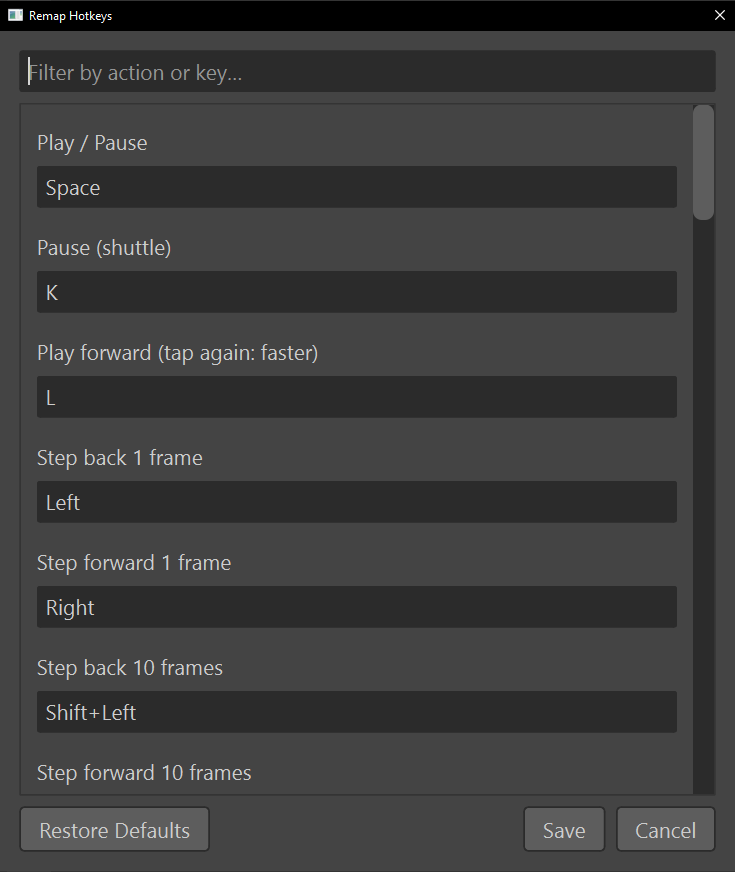
Change a hotkey
- Choose Settings › Remap Hotkeys….
- Find the action. Type in Filter by action or key… to narrow the list by
the action's name, or by a key: typing
ctrl+sfinds whatever is bound to Ctrl+S. - Click the action's key field, and press the new combination.
- Choose Save.
The new binding works at once, with nothing to restart, and every tooltip that names a key shows the new one. A row the filter hides keeps any change you made to it.
Go back to the defaults
- Choose Restore Defaults. Every key field goes back to its default, but nothing is saved yet.
- Choose Save.
What happens
- Two actions cannot share a key. Save refuses with Duplicate hotkeys, listing each shared key and the actions using it, until you change one of them.
- A binding cannot be cleared to no key at all. Replace it with another, or restore the defaults.
- Some actions start with no key. Sort shots chronologically and Import Clips from Folder… wait for you to give them one, and J is left unbound on purpose, because Shotwork does not play backward.
- Hotkeys work anywhere in the window, not only over the viewer. Typing in a text field is unaffected, because the field takes the letters first.
- A few keys are not in the list, because each belongs to one place: Up, Down, Del and Backspace on the reel timeline, and the arrow keys in the overlay template editor.
- Only your changes are stored, in
hotkeys.jsonin Shotwork's app data. A default that changes in a later version of Shotwork reaches you, unless you had changed that one.
Related
- Hotkeys for every default binding.
- Mouse and modifiers for what the mouse does.
- Tips and tricks for habits built on the keys.