Settings
Most of what you set in Shotwork is saved in the document it belongs to. The Settings menu holds what belongs to you instead, the same in every shot list and reel.
| Item | Does | See |
|---|---|---|
| Remap Hotkeys… | Changes any keyboard binding. | Hotkeys |
| Field Presets… | Sets the fields a new shot list starts with. | Field presets |
| Timeline Colors… | Sets how bright the shot colors on the source timeline are. | Timeline colors |
| Thumbnail Cache… | Rebuilds or clears shot thumbnails. Unavailable on a reel tab. | Thumbnail cache |
| Downbeat Engine… | Installs the optional downbeat engine. | Downbeat engine |
Timeline colors
- Choose Settings › Timeline Colors…. Its window is titled Settings.
- Set Timeline shot color shade, from 1 to 9. Preview shows the colors as you change it.
- Choose Save.
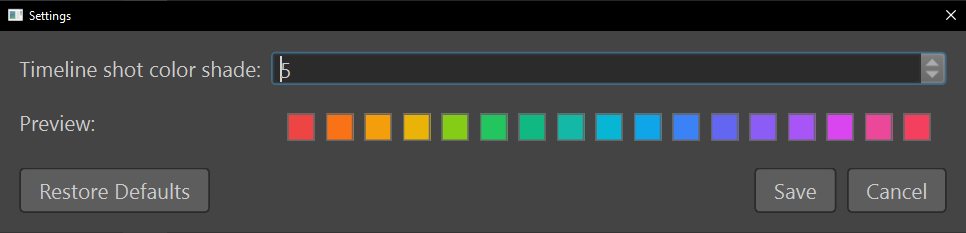
The shot bands on the source timeline change at once. Restore Defaults puts the shade back to 5, which still needs Save to keep.
What Shotwork remembers
Besides the Settings menu, Shotwork remembers these for you, in every document:
| Setting | Where you change it |
|---|---|
| The window's size and position, and the panes' widths | Resize the window, and drag the grips between the panes |
| The shot picker's list or grid, and its thumbnail size | A reel's Shots tab, or the Library window's Shots view |
| Which view the Library window opens on | View, in the Library window |
| How big logo tiles are | The size slider in the logo picker |
| Snapping on the reel timeline | Snap while dragging (N), or N |
| Frame counts instead of timecode on reels | Show frame count instead of timecode |
| Interest points on reel clips | Show interest points on clips |
| What the beat lines' heights measure | Energy = loudness (RMS) or Energy = attack sharpness |
| Your hotkeys | Settings › Remap Hotkeys… |
| The timeline color shade | Settings › Timeline Colors… |
These live in the settings.json and hotkeys.json files in
Shotwork's app data.
Related
- Reel settings for the settings a reel saves in itself.
- Where Shotwork keeps its files.