Describe a shot
The detail panel on the right holds everything Shotwork knows about the selected shot besides its in and out points. This is not bookkeeping: the reel editor runs on these fields. Overlay templates print them, draft reels sort by rating, and the filter box searches them.
Fill them in while the shot is in front of you. Reconstructing them later means watching the film again.
The fields
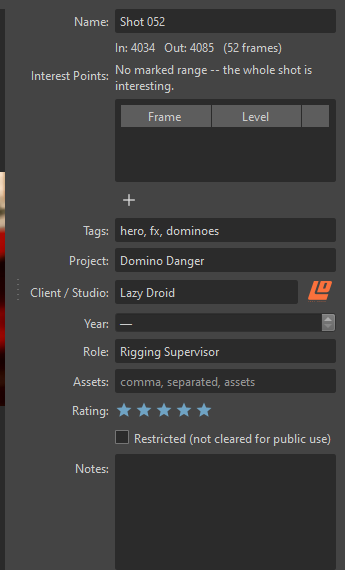
| Field | Holds | Used later by |
|---|---|---|
| Name | What this shot is. Per-shot only, never bulk-edited | Export filenames, overlays, the shot list |
| Interest Points | Frames worth keeping. See Interest points | Shortening a clip on a reel |
| Tags | Comma-separated keywords | Filtering, searching |
| Project | The production the shot came from | Overlays, filtering, the library's Projects view |
| Client / Studio | Who it was made for | Overlays, client logos, filtering |
| Year | When. Stepping up or down from empty starts at the current year | Overlays, filtering |
| Role | What you did on it | Overlays, filtering |
| Assets | Comma-separated, what you worked on | Filtering |
| Rating | Zero to five stars | Draft reels fill from your best-rated shots |
| Notes | Anything else | Filtering |
Tags, Project and Client / Studio autocomplete from a vocabulary shared across every shot list, so a tag you typed in one offers itself in all the others.
Editing several shots at once
Select more than one shot and the panel keeps the fields that can apply to all of them, such as Tags, Project and Client / Studio, and drops the ones that cannot, such as Name. Editing a kept field writes it to every selected shot.
Restricted
Restricted (not cleared for public use) flags work you do not have permission to show. It is a working feature, not a label:
- Restricted shots stay out of reels unless the reel explicitly opts in.
- Overlay templates never print the client name on a restricted shot.
- Exporting a reel that contains restricted clips asks you to confirm first.
Warning
Shotwork does not verify rights or clearances for anything. The restricted flag helps you keep track of a decision you have made. It does not make that decision for you.
Related
- Organize shots searches every field here from the filter box.