Building a reel
A reel is a .swreel document: clips arranged on a timeline, with music,
overlay templates and title cards. It draws on every shot list you have
marked, so building one is choosing and ordering rather than hunting.
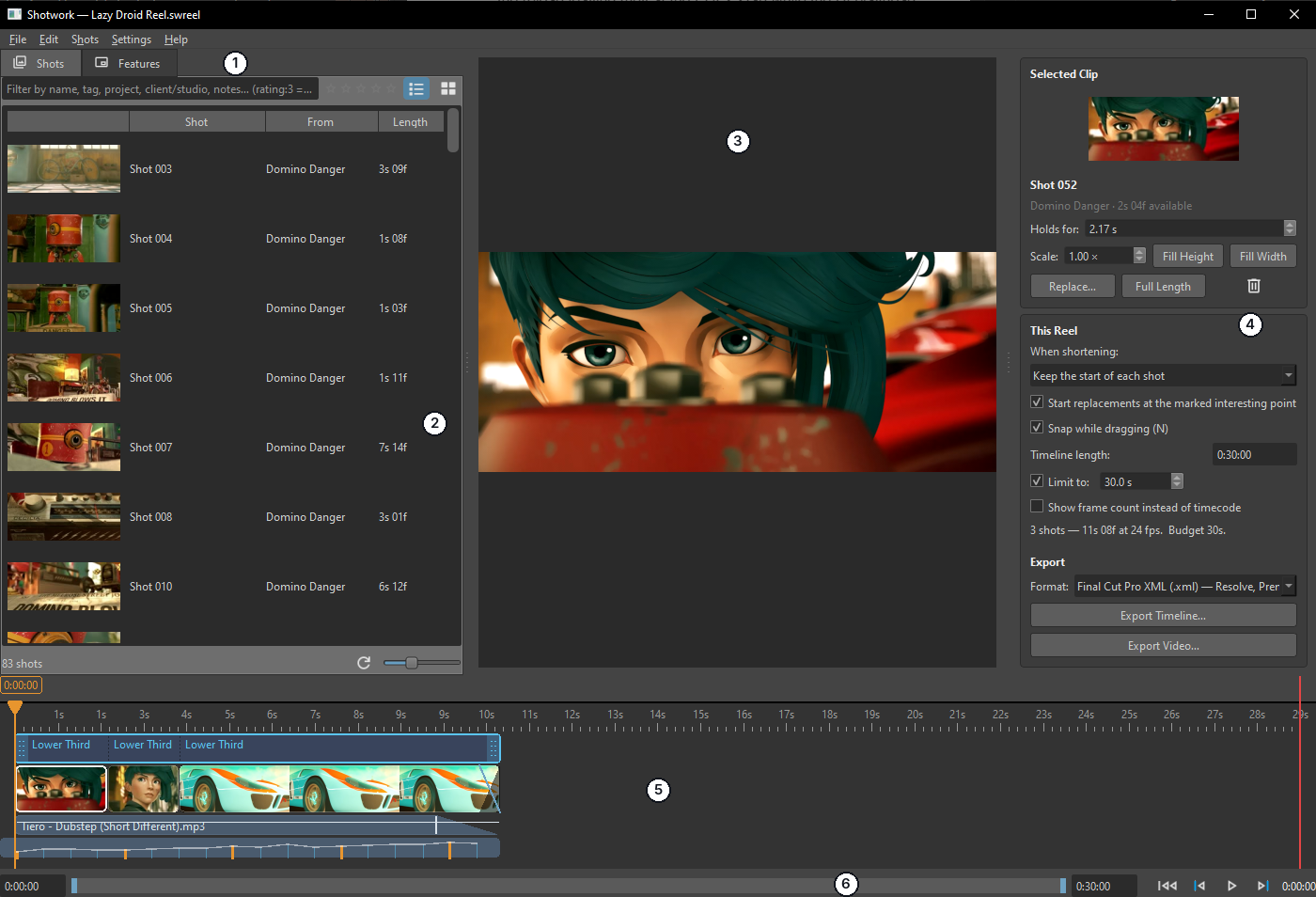
| # | Region | What it holds |
|---|---|---|
| 1 | Shots and Features tabs | Switches the left panel between the shots you can add and the features you can drag on. |
| 2 | Shot picker | Every shot in your library, filtered by the same query language the shot list uses. |
| 3 | Viewer | The reel playing, overlays and all, at export framing. |
| 4 | Reel settings | The selected clip's own settings above, the whole reel's below, and the export controls at the bottom. |
| 5 | Reel timeline | The template band on top, the clips in the middle, the music lane underneath. |
| 6 | Transport | Play, step, jump, and the reel's own length readout. |
A reel tab and a shot-list tab are different documents, and both can be open at once. See The window for the shot-list side.
Where to start
- Start a reel, empty or filled from your ratings.
- Add shots from the picker.
- Arrange clips: order, trim, roll, slide, replace.
- Holds and shortening, which is where a reel stops being a list and starts being an edit.
Then the things that make it a reel rather than a sequence: music, fades, overlay templates, cards, and a length budget.